Sidebar Plugin
A powerful, customizable navigation sidebar plugin for Payload CMS with sortable groups, pinning, custom links, and multi-color badges.
Overview
The Payload Sidebar Plugin enhances your Payload CMS admin interface with a powerful, customizable navigation sidebar featuring sortable groups, user-specific pinning, custom links, and visual notification badges.
Plugin Author
Created by Kari (tatsuyakari1203)
Features
- Sortable Navigation Groups: Define custom order for your navigation groups
- Pin Items: Pin frequently used items to the top (persisted per-user)
- Custom Links & Groups: Add your own navigation links and groups
- Custom Icons: Use Lucide icons or your own components
- Multi-color Badges: Show notification counts with different colors
- i18n Support: Works with English, Vietnamese, and other languages
- Zero Config: Works out of the box, just add to plugins
Requirements
- Payload CMS 3.x
- Next.js 14+ or 15+
- React 18+ or 19+
Installation
npm install payload-sidebar-pluginQuick Start
1. Add Plugin to Config
The plugin works with zero configuration. Simply add it to your payload.config.ts:
import { buildConfig } from 'payload'
import { payloadSidebar } from 'payload-sidebar-plugin'

export default buildConfig({
  plugins: [
    payloadSidebar(), // Zero config - works out of the box!
  ],
  // ... rest of config
})
Automatic Setup
The plugin will automatically replace the default navigation with the enhanced sidebar. No additional configuration required to get started!
2. Optional: Configure Custom Features
Enhance your sidebar with custom links, groups, and ordering:
import { payloadSidebar } from 'payload-sidebar-plugin'
import { BarChart3, BookOpen } from 'lucide-react'

export default buildConfig({
  plugins: [
    payloadSidebar({
      groupOrder: {
        Content: 1,
        Users: 2,
        Settings: 3,
      },
      customLinks: [
        {
          label: 'Analytics',
          href: '/admin/analytics',
          group: 'Tools',
          icon: BarChart3,
        },
      ],
    }),
  ],
})
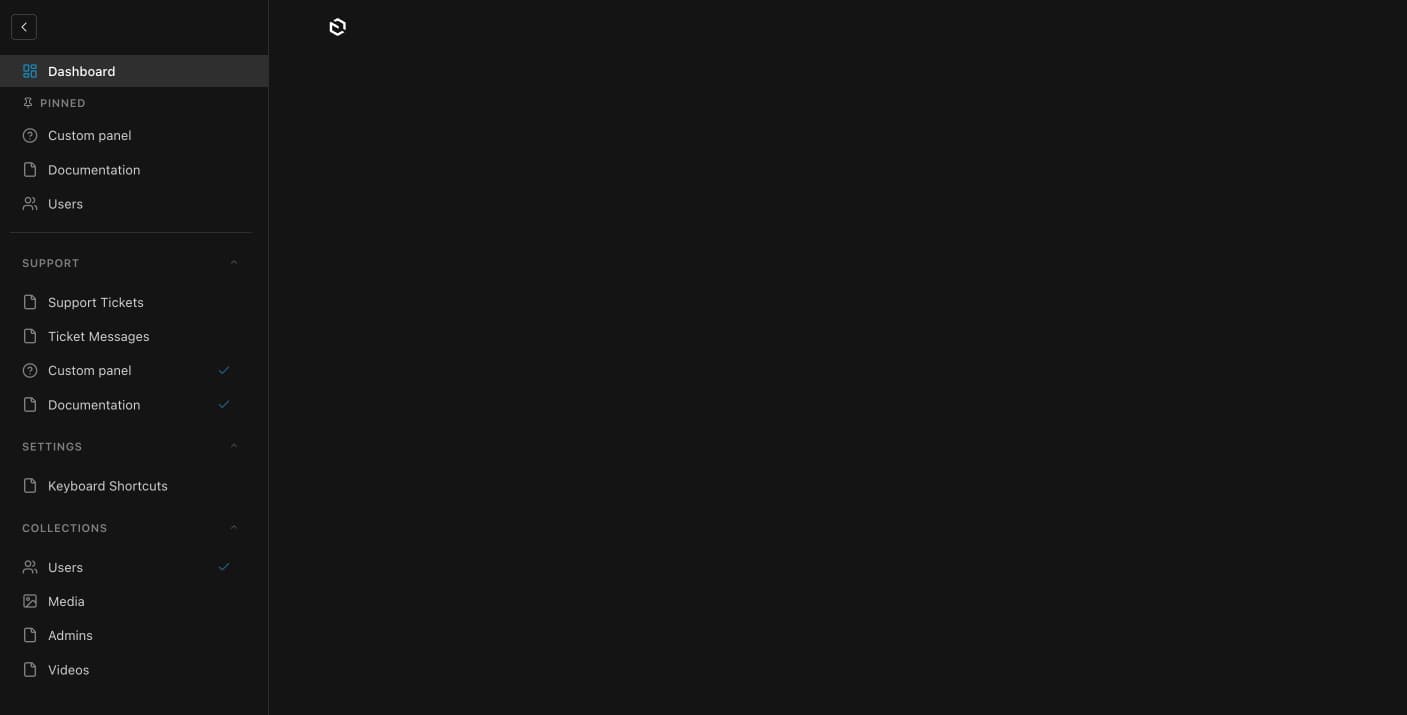
Screenshots
Configuration
Plugin Options
Prop
Type
CustomLink Interface
Each custom link supports the following properties:
Prop
Type
CustomGroup Interface
Prop
Type
Custom Links & Groups
Add your own navigation links that aren't tied to Payload collections or globals. Perfect for admin dashboards, external documentation, third-party integrations, and quick access tools.
Basic Usage
import { payloadSidebar } from 'payload-sidebar-plugin'
import { BarChart3, BookOpen, FileCode, Github } from 'lucide-react'

export default buildConfig({
  plugins: [
    payloadSidebar({
      customLinks: [
        // Internal admin views
        {
          label: 'System Monitor',
          href: '/admin/system-monitor',
          group: 'Tools',
          icon: BarChart3,
          order: 1,
        },
        {
          label: 'API Explorer',
          href: '/api',
          group: 'Tools',
          icon: FileCode,
          order: 2,
        },
        // External resources (opens in new tab)
        {
          label: 'Payload Docs',
          href: 'https://payloadcms.com/docs',
          group: 'Resources',
          icon: BookOpen,
          external: true,
        },
        {
          label: 'GitHub Repo',
          href: 'https://github.com/your-org/your-repo',
          group: 'Resources',
          icon: Github,
          external: true,
        },
      ],

      customGroups: [
        { label: 'Tools', order: 15 },
        { label: 'Resources', order: 99, defaultOpen: false },
      ],
    }),
  ],
})
Available Default Icon Keys
The plugin includes default icon mappings for common use cases:
Content:
pages,posts,media,files,categories
Users & Settings:
users,settings,dashboard
Tools:
terminal,api,file-code,chart
External:
link,external-link,globe,docs
General:
sparkles,zap,star,folder,help,info
Group Ordering
Control the order of navigation groups with support for internationalization:
payloadSidebar({
  groupOrder: {
    // English labels
    Content: 1,
    Media: 2,
    Users: 3,
    Settings: 10,

    // Vietnamese labels (for i18n)
    'Nội dung': 1,
    'Phương tiện': 2,
    'Người dùng': 3,
    'Cài đặt': 10,

    // Custom groups
    Tools: 15,
    Resources: 99,

    // Unlisted groups default to priority 50
  },
})
Internationalization
The plugin supports multiple language labels for the same group. Define ordering for each language variant your application uses.
Pinning Items
Users can pin frequently used items to the top of the sidebar for quick access. Pinned items appear in a dedicated "Pinned" section and persist across sessions.
Features
- Click the pin icon on any navigation item to pin it
- Pinned items appear at the top in a dedicated section
- Unpin items by clicking the X button
- Works with collections, globals, and custom links
- User-specific pins (each user has their own pinned items)
Storage Options
Server-side storage (recommended):
payloadSidebar({
  pinnedStorage: 'preferences', // Uses Payload's preference system
})
Server-side storage syncs pinned items across devices and sessions using Payload's built-in preference system.
Client-side storage:
payloadSidebar({
  pinnedStorage: 'localStorage', // Simpler, but doesn't sync across devices
})
Client-side storage is simpler to set up but doesn't sync across devices or sessions.
API Routes Setup
When using pinnedStorage: 'preferences', you need to create API routes to handle server-side persistence. Create these four routes in your Next.js application:
1. Get Pinned Items Route
Create src/app/api/nav/pinned/route.ts:
import { getPayload } from 'payload'
import config from '@payload-config'
import { NextResponse } from 'next/server'
import { headers } from 'next/headers'

export interface PinnedItem {
  slug: string
  type: 'collection' | 'global' | 'custom'
  order: number
}

export async function GET() {
  try {
    const payload = await getPayload({ config })
    const headersList = await headers()
    const { user } = await payload.auth({ headers: headersList })

    if (!user) {
      return NextResponse.json({ pinnedItems: [] })
    }

    const prefs = await payload.find({
      collection: 'payload-preferences',
      where: {
        key: { equals: 'nav-pinned' },
        'user.value': { equals: user.id },
      },
      limit: 1,
      depth: 0,
    })

    const pinnedItems = (prefs.docs[0]?.value as { pinnedItems?: PinnedItem[] })?.pinnedItems || []
    return NextResponse.json({ pinnedItems })
  } catch (error) {
    console.error('Error fetching pinned items:', error)
    return NextResponse.json({ pinnedItems: [] })
  }
}
2. Pin Item Route
Create src/app/api/nav/pin/route.ts:
import { getPayload } from 'payload'
import config from '@payload-config'
import { NextResponse } from 'next/server'
import { headers } from 'next/headers'
import type { PinnedItem } from '../pinned/route'

export async function POST(request: Request) {
  try {
    const payload = await getPayload({ config })
    const headersList = await headers()
    const { user } = await payload.auth({ headers: headersList })

    if (!user) {
      return NextResponse.json({ error: 'Unauthorized' }, { status: 401 })
    }

    const { slug, type } = await request.json()

    const prefs = await payload.find({
      collection: 'payload-preferences',
      where: {
        key: { equals: 'nav-pinned' },
        'user.value': { equals: user.id },
      },
      limit: 1,
      depth: 0,
    })

    const existingItems: PinnedItem[] =
      (prefs.docs[0]?.value as { pinnedItems?: PinnedItem[] })?.pinnedItems || []

    if (existingItems.some(item => item.slug === slug && item.type === type)) {
      return NextResponse.json({ success: true, message: 'Already pinned' })
    }

    const newItems: PinnedItem[] = [...existingItems, { slug, type, order: existingItems.length }]
    const userCollection = (user as { collection?: string }).collection || 'users'

    await payload.db.upsert({
      collection: 'payload-preferences',
      data: {
        key: 'nav-pinned',
        user: { relationTo: userCollection, value: user.id },
        value: { pinnedItems: newItems },
      },
      where: {
        and: [
          { key: { equals: 'nav-pinned' } },
          { 'user.value': { equals: user.id } },
          { 'user.relationTo': { equals: userCollection } },
        ],
      },
    })

    return NextResponse.json({ success: true, pinnedItems: newItems })
  } catch (error) {
    console.error('Error pinning item:', error)
    return NextResponse.json({ error: 'Failed to pin' }, { status: 500 })
  }
}
3. Unpin Item Route
Create src/app/api/nav/unpin/route.ts:
import { getPayload } from 'payload'
import config from '@payload-config'
import { NextResponse } from 'next/server'
import { headers } from 'next/headers'
import type { PinnedItem } from '../pinned/route'

export async function POST(request: Request) {
  try {
    const payload = await getPayload({ config })
    const headersList = await headers()
    const { user } = await payload.auth({ headers: headersList })

    if (!user) {
      return NextResponse.json({ error: 'Unauthorized' }, { status: 401 })
    }

    const { slug, type } = await request.json()

    const prefs = await payload.find({
      collection: 'payload-preferences',
      where: {
        key: { equals: 'nav-pinned' },
        'user.value': { equals: user.id },
      },
      limit: 1,
      depth: 0,
    })

    if (!prefs.docs[0]) {
      return NextResponse.json({ success: true, message: 'No pinned items' })
    }

    const existingItems: PinnedItem[] =
      (prefs.docs[0]?.value as { pinnedItems?: PinnedItem[] })?.pinnedItems || []

    const newItems = existingItems
      .filter(item => !(item.slug === slug && item.type === type))
      .map((item, index) => ({ ...item, order: index }))

    const userCollection = (user as { collection?: string }).collection || 'users'

    await payload.db.upsert({
      collection: 'payload-preferences',
      data: {
        key: 'nav-pinned',
        user: { relationTo: userCollection, value: user.id },
        value: { pinnedItems: newItems },
      },
      where: {
        and: [
          { key: { equals: 'nav-pinned' } },
          { 'user.value': { equals: user.id } },
          { 'user.relationTo': { equals: userCollection } },
        ],
      },
    })

    return NextResponse.json({ success: true, pinnedItems: newItems })
  } catch (error) {
    console.error('Error unpinning item:', error)
    return NextResponse.json({ error: 'Failed to unpin' }, { status: 500 })
  }
}
4. Reorder Pinned Items Route
Create src/app/api/nav/reorder/route.ts:
import { getPayload } from 'payload'
import config from '@payload-config'
import { NextResponse } from 'next/server'
import { headers } from 'next/headers'
import type { PinnedItem } from '../pinned/route'

export async function POST(request: Request) {
  try {
    const payload = await getPayload({ config })
    const headersList = await headers()
    const { user } = await payload.auth({ headers: headersList })

    if (!user) {
      return NextResponse.json({ error: 'Unauthorized' }, { status: 401 })
    }

    const { items } = await request.json()

    const reorderedItems = items.map((item: PinnedItem, index: number) => ({
      ...item,
      order: index,
    }))

    const userCollection = (user as { collection?: string }).collection || 'users'

    await payload.db.upsert({
      collection: 'payload-preferences',
      data: {
        key: 'nav-pinned',
        user: { relationTo: userCollection, value: user.id },
        value: { pinnedItems: reorderedItems },
      },
      where: {
        and: [
          { key: { equals: 'nav-pinned' } },
          { 'user.value': { equals: user.id } },
          { 'user.relationTo': { equals: userCollection } },
        ],
      },
    })

    return NextResponse.json({ success: true, pinnedItems: reorderedItems })
  } catch (error) {
    console.error('Error reordering items:', error)
    return NextResponse.json({ error: 'Failed to reorder' }, { status: 500 })
  }
}
Badge System
Display notification counts, statistics, or status indicators on navigation items using the badge system.
Setup
Step 1: Create Badge Provider
Create a client component to provide badge data:
// src/components/NavBadgeProvider.tsx
'use client'

import React from 'react'
import { SidebarBadgeProvider } from 'payload-sidebar-plugin/components'

export function NavBadgeProvider({ children }: { children: React.ReactNode }) {
  const badges = {
    // Key must match collection/global slug exactly
    posts: { count: 5, color: 'blue' as const },
    comments: { count: 12, color: 'red' as const },
  }

  return <SidebarBadgeProvider badges={badges}>{children}</SidebarBadgeProvider>
}
Step 2: Register as Admin Provider
Add the provider to your Payload config:
// payload.config.ts
export default buildConfig({
  admin: {
    components: {
      providers: ['@/components/NavBadgeProvider'],
    },
  },
})
Step 3: Generate Import Map
npx payload generate:importmapBadge Colors
| Color | Use Case | Example |
|---|---|---|
red | Urgent, unread, errors | Unread messages, failed jobs |
orange | Warnings, needs attention | Pending comments |
yellow | Drafts, pending review | Draft posts |
blue | Informational | Total pages |
green | Success, published | Published posts |
gray | Archived, inactive | Media count |
Real-time Badges Example
Create dynamic badges that update based on your application state:
// src/components/NavBadgeProvider.tsx
'use client'

import React from 'react'
import { SidebarBadgeProvider } from 'payload-sidebar-plugin/components'
import { useNotifications } from '@/providers/NotificationProvider'

export function NavBadgeProvider({ children }: { children: React.ReactNode }) {
  const { unreadChats, unreadComments } = useNotifications()

  const badges: Record<
    string,
    { count: number; color: 'red' | 'yellow' | 'blue' | 'green' | 'orange' | 'gray' }
  > = {}

  // Only show badges when there are unread items
  if (unreadChats > 0) {
    badges['chat-dashboard'] = { count: unreadChats, color: 'red' }
  }
  if (unreadComments > 0) {
    badges['comments-dashboard'] = { count: unreadComments, color: 'orange' }
  }

  return <SidebarBadgeProvider badges={badges}>{children}</SidebarBadgeProvider>
}
Styling
The plugin uses BEM-style CSS classes with a configurable prefix for easy customization.
CSS Class Structure
/* Main container */
.nav { }
.nav--nav-open { }
.nav__scroll { }
.nav__wrap { }

/* Pinned section */
.nav__pinned-section { }
.nav__pinned-header { }
.nav__pinned-items { }
.nav__pinned-item { }

/* Links */
.nav__link { }
.nav__link--active { }
.nav__link--external { }
.nav__link-icon { }
.nav__link-label { }
.nav__link-badge { }
.nav__link-external-icon { }

/* Pin button */
.nav__pin-btn { }
.nav__pin-btn--pinned { }
.nav__unpin-btn { }
Custom Styling Example
/* Enhance pinned section */
.nav__pinned-section {
  background: var(--theme-elevation-50);
  border-radius: 8px;
  margin: 8px;
  padding: 8px;
}

/* Custom active state */
.nav__link--active {
  background: var(--theme-elevation-100);
  border-left: 3px solid var(--theme-success-500);
}

/* Style external link icon */
.nav__link-external-icon {
  opacity: 0.5;
  margin-left: auto;
}
CSS Variables Override
payloadSidebar({
  cssVariables: {
    '--badge-red-bg': '#ef4444',
    '--badge-blue-bg': '#3b82f6',
    '--badge-green-bg': '#10b981',
  },
})
Examples
Blog Setup
import { payloadSidebar } from 'payload-sidebar-plugin'
import { BookOpen, FileText } from 'lucide-react'

export default buildConfig({
  plugins: [
    payloadSidebar({
      groupOrder: {
        Content: 1,
        Media: 2,
        Users: 3,
        Settings: 10,
      },
      customLinks: [
        {
          label: 'Writing Guide',
          href: 'https://docs.example.com/writing',
          group: 'Resources',
          icon: BookOpen,
          external: true,
        },
      ],
      customGroups: [
        { label: 'Resources', order: 99, defaultOpen: false },
      ],
    }),
  ],
})
E-commerce Setup
import { payloadSidebar } from 'payload-sidebar-plugin'
import { BarChart3, Package } from 'lucide-react'

export default buildConfig({
  plugins: [
    payloadSidebar({
      groupOrder: {
        Products: 1,
        Orders: 2,
        Customers: 3,
        Analytics: 4,
        Settings: 99,
      },
      customLinks: [
        {
          label: 'Sales Dashboard',
          href: '/admin/sales-dashboard',
          group: 'Analytics',
          icon: BarChart3,
        },
        {
          label: 'Inventory',
          href: '/admin/inventory',
          group: 'Products',
          icon: Package,
          order: 0,
        },
        {
          label: 'Stripe Dashboard',
          href: 'https://dashboard.stripe.com',
          group: 'External',
          external: true,
        },
      ],
      customGroups: [
        { label: 'Analytics', order: 4 },
        { label: 'External', order: 100, defaultOpen: false },
      ],
    }),
  ],
})
API Reference
Exports
// Main plugin
import { payloadSidebar } from 'payload-sidebar-plugin'

// Client components
import {
  SidebarBadgeProvider,
  CustomNavClient,
  NavContent,
  NavLink,
  PinnedSection,
} from 'payload-sidebar-plugin/components'

// Hooks
import { useBadge, usePinnedNav } from 'payload-sidebar-plugin/hooks'

// Server components (RSC)
import { CustomNav } from 'payload-sidebar-plugin/rsc'

// Types
import type {
  PayloadSidebarPluginOptions,
  CustomLink,
  CustomGroup,
  NavEntity,
  PinnedItem,
  BadgeConfig,
  BadgeColor,
} from 'payload-sidebar-plugin'
useBadge Hook
Access badge information for a specific navigation item:
import { useBadge } from 'payload-sidebar-plugin/hooks'

function MyComponent() {
  const badge = useBadge('posts')
  // Returns { count: 5, color: 'blue' } or null

  if (badge) {
    return <span className={`badge--${badge.color}`}>{badge.count}</span>
  }
  return null
}
usePinnedNav Hook
Manage pinned navigation items programmatically:
import { usePinnedNav } from 'payload-sidebar-plugin/hooks'

function MyComponent() {
  const {
    pinnedItems,  // Array of pinned items
    loading,      // Loading state
    isPinned,     // Check if item is pinned
    pinItem,      // Pin an item
    unpinItem,    // Unpin an item
    togglePin,    // Toggle pin state
    refresh,      // Refresh pinned items
  } = usePinnedNav()

  return (
    <button onClick={() => togglePin('posts', 'collection')}>
      {isPinned('posts', 'collection') ? 'Unpin' : 'Pin'} Posts
    </button>
  )
}
Troubleshooting
Plugin Not Showing Custom Navigation
Solutions:
- Regenerate the import map:
npx payload generate:importmap - Clear Next.js cache and restart:
rm -rf .next && npm run dev - Check browser console for errors
Custom Links Not Appearing
Solutions:
- Verify
customLinksarray is properly formatted - Ensure
groupproperty matches a group incustomGroupsor existing Payload groups - Check that the icon import is correct (if using Lucide icons)
- Verify no TypeScript errors in your configuration
Badges Not Appearing
Solutions:
- Ensure
SidebarBadgeProvideris registered inadmin.components.providers - Verify badge keys match collection/global slugs exactly (case-sensitive)
- Check that badge count is greater than 0
- Run
npx payload generate:importmapafter adding the provider - Clear browser cache and restart development server
Pinned Items Not Persisting
For pinnedStorage: 'preferences':
- Verify all 4 API routes are created in the correct locations
- Check that user is authenticated when pinning
- Inspect browser console for API errors
- Verify the
payload-preferencescollection exists - Check server logs for database errors
For pinnedStorage: 'localStorage':
- Verify browser supports localStorage
- Check for privacy extensions blocking storage
- Look for localStorage quota errors in console
Style Conflicts
Solutions:
- Use a custom
classPrefixto namespace classes:payloadSidebar({ classPrefix: 'my-nav', }) - Override specific CSS variables
- Use browser DevTools to inspect and identify conflicting styles
- Check for CSS specificity issues
Performance Issues
Solutions:
- Limit the number of custom links (recommended: under 20)
- Use
defaultOpen: falsefor groups with many items - Optimize badge calculations to avoid frequent re-renders
- Consider lazy-loading external link metadata
Links
License
MIT © Kari (tatsuyakari1203)