Enhanced Sidebar Plugin
An enhanced sidebar plugin for Payload CMS that adds a tabbed navigation system to organize collections and globals into logical groups.
Development Status
This plugin is in early development and has not been extensively tested. Use with caution in production environments.
Overview
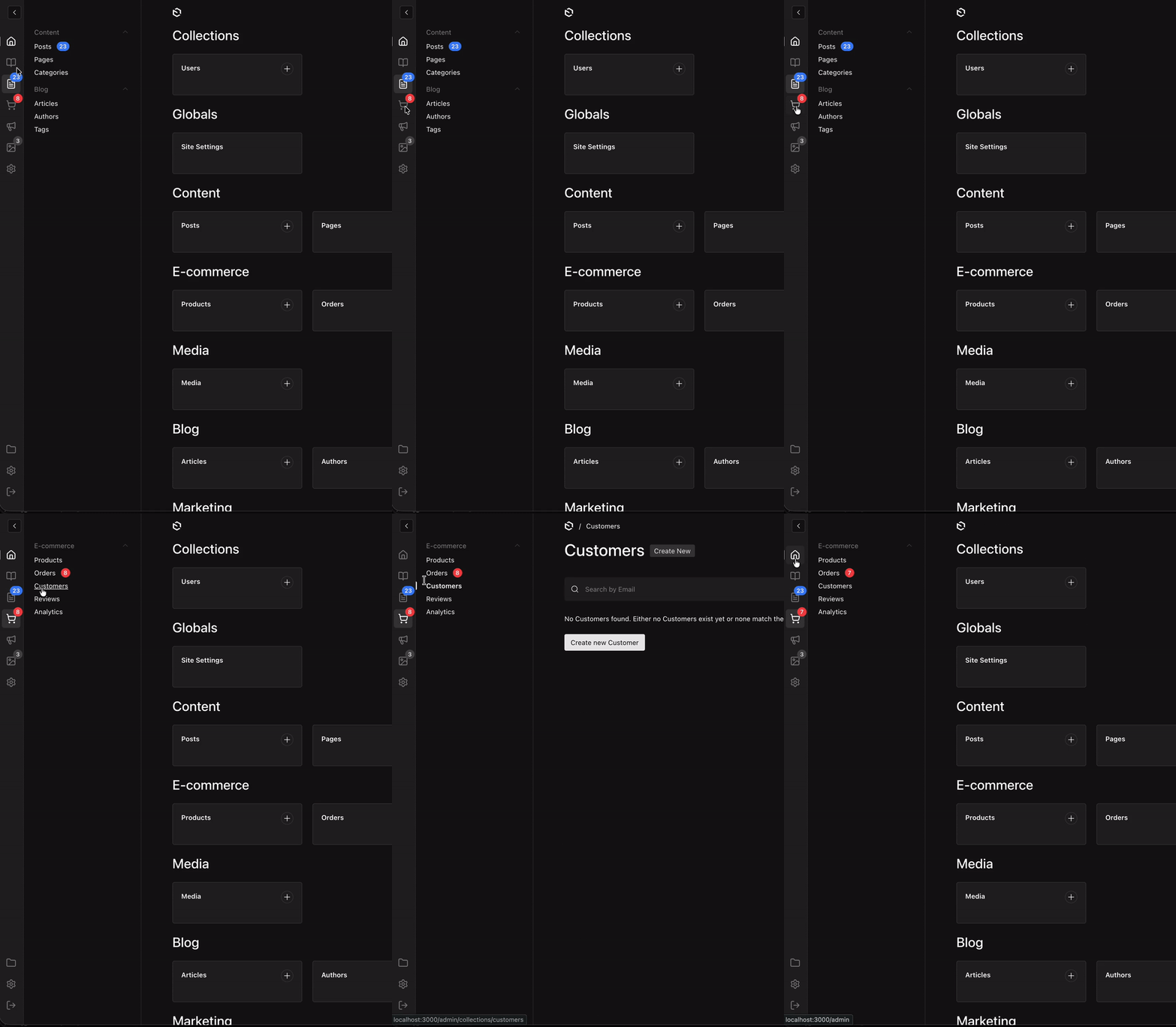
The Payload Enhanced Sidebar Plugin transforms your admin navigation with a modern tabbed interface, helping you organize collections and globals into logical groups for cleaner, more efficient navigation.
Features
- Tabbed Navigation: Organize collections into separate tabs for cleaner navigation
- Vertical Tab Bar: Icon-based tabs on the left side of the sidebar
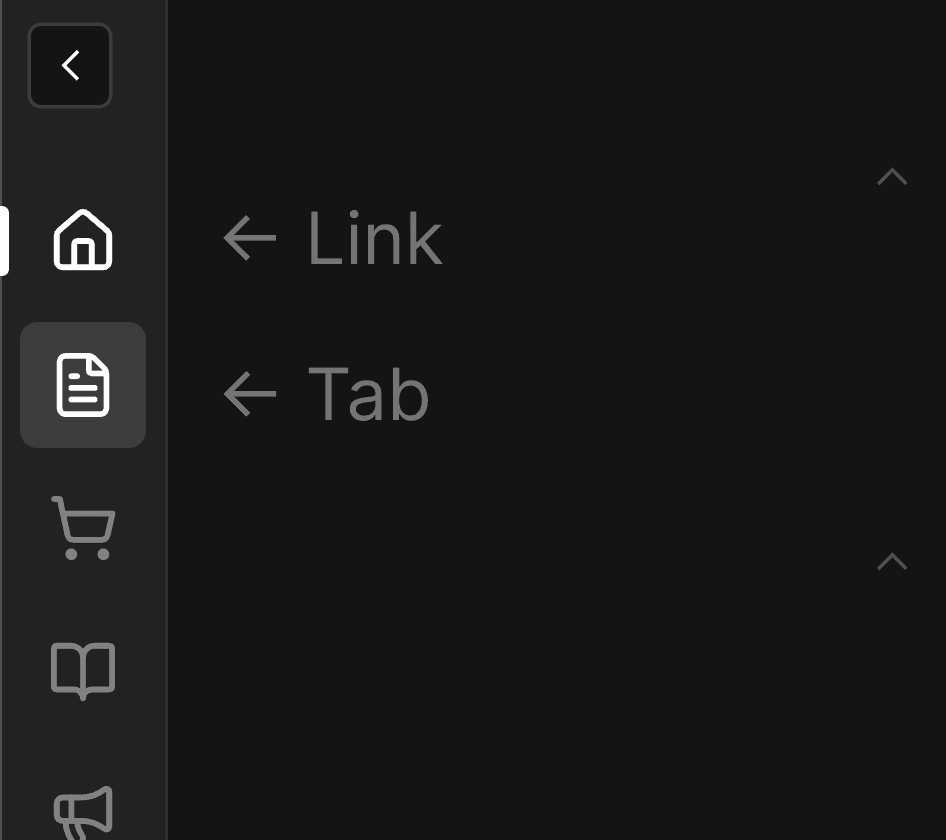
- Link Support: Add navigation links (like Dashboard) alongside tabs
- Custom Items: Add custom navigation items that can be merged into existing groups
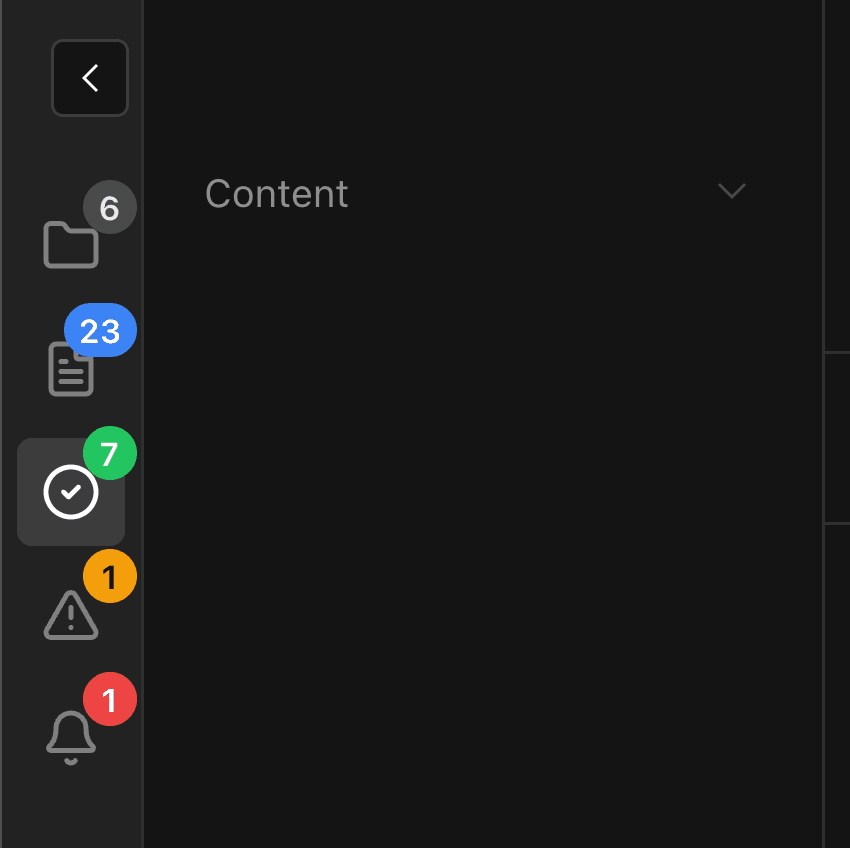
- Badges: Show notification badges on tabs and navigation items (API-based or reactive provider)
- i18n Support: Full localization support for labels and groups
- Lucide Icons: Use any Lucide icon for tabs and links
Installation
npm install @veiag/payload-enhanced-sidebarQuick Start
import { payloadEnhancedSidebar } from '@veiag/payload-enhanced-sidebar'
import { buildConfig } from 'payload'

export default buildConfig({
  // ... your config
  plugins: [
    payloadEnhancedSidebar({
      // Works with defaults!
    }),
  ],
})
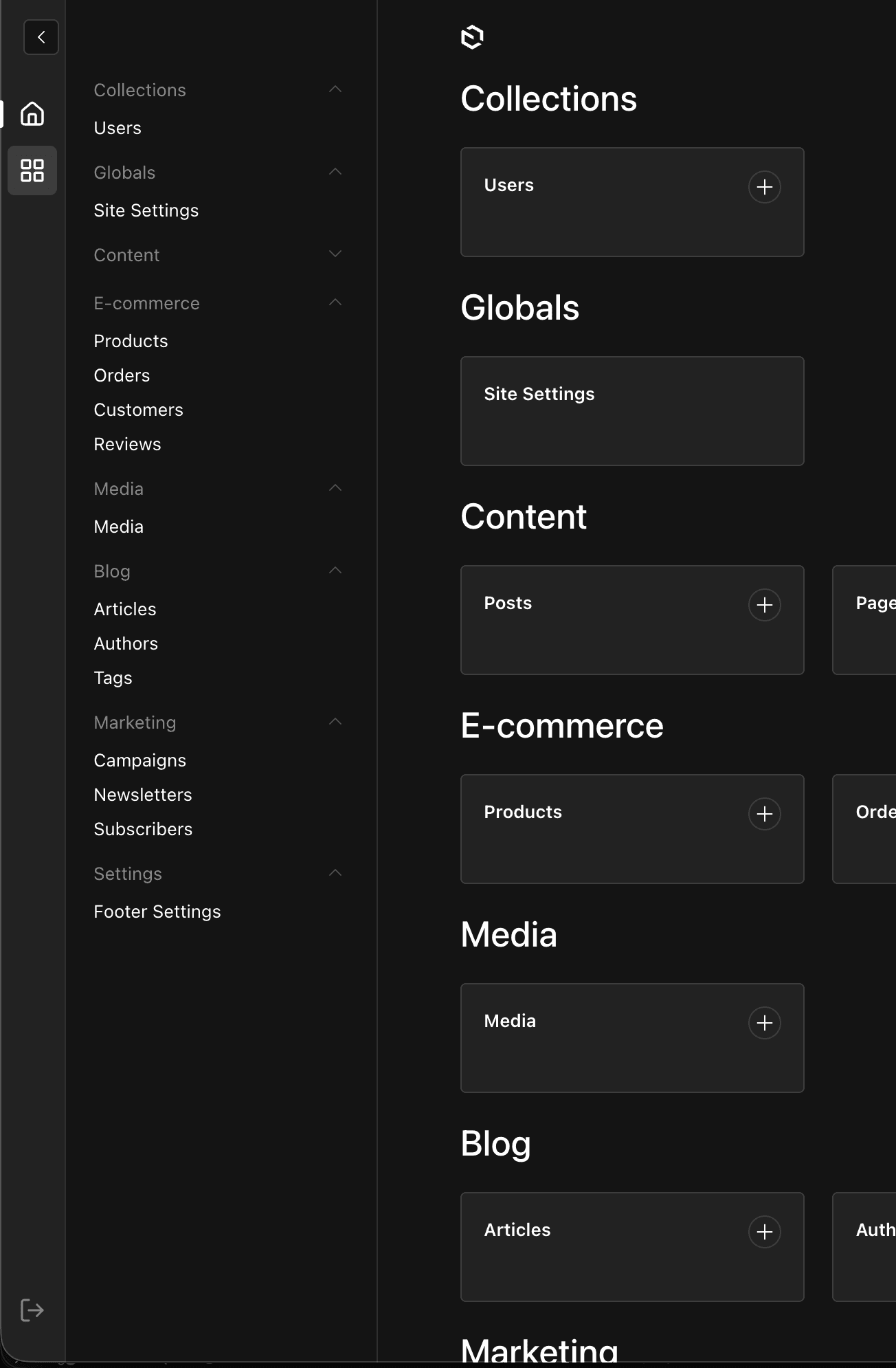
This will add:
- A Dashboard link at the top
- A default tab showing all collections and globals
- A logout button at the bottom
Configuration
Full Configuration Example
import { payloadEnhancedSidebar } from '@veiag/payload-enhanced-sidebar'
import { buildConfig } from 'payload'

export default buildConfig({
  plugins: [
    payloadEnhancedSidebar({
      // Tabs and links in the sidebar
      tabs: [
        // Dashboard link
        {
          id: 'dashboard',
          type: 'link',
          href: '/',
          icon: 'House',
          label: { en: 'Dashboard', uk: 'Головна' },
        },
        // Content tab - shows specific collections
        {
          id: 'content',
          type: 'tab',
          icon: 'FileText',
          label: { en: 'Content', uk: 'Контент' },
          collections: ['posts', 'pages', 'categories'],
        },
        // Link to external documentation
        {
          id: 'docs',
          type: 'link',
          href: 'https://payloadcms.com/',
          icon: 'BookOpen',
          isExternal: true,
          label: { en: 'Documentation', uk: 'Документація' },
        },
        // E-commerce tab with custom items
        {
          id: 'ecommerce',
          type: 'tab',
          icon: 'ShoppingCart',
          label: { en: 'E-commerce', uk: 'E-commerce' },
          collections: ['products', 'orders', 'customers'],
          customItems: [
            {
              slug: 'analytics',
              href: '/analytics',
              label: { en: 'Analytics', uk: 'Аналітика' },
              group: 'E-commerce', // Merge into existing group
            },
          ],
        },
        // Settings tab with globals
        {
          id: 'settings',
          type: 'tab',
          icon: 'Settings',
          label: { en: 'Settings', uk: 'Налаштування' },
          collections: ['users'],
          globals: ['site-settings', 'footer-settings'],
          customItems: [
            {
              slug: 'api-keys',
              href: '/api-keys',
              label: { en: 'API Keys', uk: 'API Ключі' },
              // No group - will appear at the bottom
            },
            {
              slug:'external-link',
              href: 'https://example.com',
              isExternal: true,
              label: { en: 'External Link', uk: 'Зовнішнє Посилання'}
            }
          ],
        },
      ],

      // Show/hide logout button (default: true)
      showLogout: true,

      // Disable the plugin
      disabled: false,
    }),
  ],
})
Plugin Options
tabs
Array of tabs and links to show in the sidebar.
Tab Configuration (type: 'tab')
Prop
Type
Default Behavior
If neither collections nor globals are specified, the tab shows all collections and globals.
Link Configuration (type: 'link')
Prop
Type
customItems
Custom items can be added to any tab to extend navigation functionality:
{
  slug: 'unique-slug',           // Required: unique identifier
  href: '/path',                 // Required: URL (relative or absolute)
  label: { en: 'Label' },        // Required: display label
  group: { en: 'Group Name' },   // Optional: merge into existing group or create new
  isExternal: true,              // Optional: if true, href is absolute URL
}
Group Behavior
- Existing Group: If
groupmatches an existing collection group label, the item is added to that group - New Group: If
groupdoesn't match any existing group, a new group is created - Ungrouped: If
groupis not specified, the item appears at the bottom without grouping
General Options
Prop
Type
Badges
Badges allow you to show notification counts on tabs and navigation items, perfect for drawing attention to pending tasks, unread notifications, or item counts.
Badge Configuration
There are three ways to configure badges:
1. Badges on Tabs/Links
Add a badge property directly to any tab or link:
tabs: [
  {
    id: 'orders',
    type: 'tab',
    icon: 'ShoppingCart',
    label: 'Orders',
    collections: ['orders'],
    badge: {
      type: 'collection-count',
      collectionSlug: 'orders',
      color: 'error',
    },
  },
]
2. Badges on Navigation Items
Use the badges configuration to add badges to sidebar items:
payloadEnhancedSidebar({
  badges: {
    // Show document count for posts collection
    posts: { type: 'collection-count', color: 'primary' },
    // Custom API endpoint
    orders: {
      type: 'api',
      endpoint: '/api/orders/pending',
      responseKey: 'count',
      color: 'error',
    },
    // Provider-based (reactive)
    notifications: { type: 'provider', color: 'warning' },
  },
})
Badge Types
Collection Count
Automatically fetches document count from a collection:
Prop
Type
{
  type: 'collection-count',
  collectionSlug: 'orders',
  color: 'error',
  where: { status: { equals: 'pending' } },
}
API Endpoint
Fetches badge value from a custom API endpoint:
Prop
Type
{
  type: 'api',
  endpoint: '/api/orders/pending',
  method: 'GET',
  responseKey: 'count',
  color: 'error',
}
Provider (Reactive)
Uses reactive values from BadgeProvider context for real-time updates:
Prop
Type
{
  type: 'provider',
  slug: 'notifications',
  color: 'warning',
}
Using BadgeProvider
For reactive badges with real-time updates (websockets, polling, etc.):
Step 1: Create a provider component:
// components/MyBadgeProvider.tsx
'use client'

import { BadgeProvider } from '@veiag/payload-enhanced-sidebar'
import { useEffect, useState } from 'react'

export const MyBadgeProvider = ({ children }) => {
  const [counts, setCounts] = useState({
    orders: 0,
    notifications: 0,
  })

  useEffect(() => {
    // Fetch initial counts, subscribe to websocket, etc.
    const ws = new WebSocket('wss://your-api/counts')
    ws.onmessage = (e) => setCounts(JSON.parse(e.data))
    return () => ws.close()
  }, [])

  return <BadgeProvider values={counts}>{children}</BadgeProvider>
}
Step 2: Add it to Payload's providers:
// payload.config.ts
export default buildConfig({
  admin: {
    components: {
      providers: ['./components/MyBadgeProvider#MyBadgeProvider'],
    },
  },
})
Step 3: Configure badges to use the provider:
payloadEnhancedSidebar({
  badges: {
    orders: { type: 'provider', color: 'error' },
  },
  tabs: [
    {
      id: 'notifications',
      type: 'link',
      href: '/notifications',
      icon: 'Bell',
      label: 'Notifications',
      badge: { type: 'provider', slug: 'notifications', color: 'warning' },
    },
  ],
})
Badge Colors
Available color themes: default, primary, success, warning, error
Badge Display Rules
- Numbers up to 99 are shown as-is
- Numbers > 99 are shown as "99+"
- Zero or undefined values hide the badge
- Provider values can also be React nodes for custom rendering
Localization
All labels support localized strings for internationalization:
// Simple string
label: 'Dashboard'

// Localized object
label: {
  en: 'Dashboard',
  uk: 'Головна',
  de: 'Übersicht',
  fr: 'Tableau de bord',
}
The plugin will automatically use the appropriate translation based on the user's locale settings.
Payload Features Support
The plugin seamlessly integrates with Payload's built-in features:
- Browse by Folder Button: Automatically shows folder view button when Payload folders are enabled (requires Payload v3.41.0+)
- Settings Menu Items: Integrates with Payload's SettingsMenu components (requires Payload v3.60.0+)
Examples
Blog Setup
payloadEnhancedSidebar({
  tabs: [
    {
      id: 'dashboard',
      type: 'link',
      href: '/',
      icon: 'House',
      label: 'Dashboard',
    },
    {
      id: 'content',
      type: 'tab',
      icon: 'FileText',
      label: 'Content',
      collections: ['posts', 'pages', 'categories'],
      badge: {
        type: 'collection-count',
        collectionSlug: 'posts',
        where: { status: { equals: 'draft' } },
        color: 'warning',
      },
    },
    {
      id: 'users',
      type: 'tab',
      icon: 'Users',
      label: 'Users',
      collections: ['users'],
      globals: ['site-settings'],
    },
  ],
})
E-commerce Setup
payloadEnhancedSidebar({
  tabs: [
    {
      id: 'dashboard',
      type: 'link',
      href: '/',
      icon: 'BarChart',
      label: 'Dashboard',
    },
    {
      id: 'catalog',
      type: 'tab',
      icon: 'Package',
      label: 'Catalog',
      collections: ['products', 'categories', 'brands'],
    },
    {
      id: 'orders',
      type: 'tab',
      icon: 'ShoppingCart',
      label: 'Orders',
      collections: ['orders', 'customers'],
      badge: {
        type: 'api',
        endpoint: '/api/orders/pending',
        color: 'error',
      },
    },
    {
      id: 'settings',
      type: 'tab',
      icon: 'Settings',
      label: 'Settings',
      collections: ['users'],
      globals: ['shipping-settings', 'payment-settings'],
    },
  ],
})
Multi-language Platform
payloadEnhancedSidebar({
  tabs: [
    {
      id: 'dashboard',
      type: 'link',
      href: '/',
      icon: 'Home',
      label: {
        en: 'Dashboard',
        uk: 'Головна',
        de: 'Übersicht',
      },
    },
    {
      id: 'content',
      type: 'tab',
      icon: 'FileText',
      label: {
        en: 'Content',
        uk: 'Контент',
        de: 'Inhalt',
      },
      collections: ['articles', 'pages'],
    },
    {
      id: 'docs',
      type: 'link',
      href: 'https://docs.example.com',
      icon: 'BookOpen',
      isExternal: true,
      label: {
        en: 'Documentation',
        uk: 'Документація',
        de: 'Dokumentation',
      },
    },
  ],
})
Contributing
Contributions are welcome! Here's how you can help:
- Fork the repository
- Create your feature branch (
git checkout -b feature/amazing-feature) - Commit your changes (
git commit -m 'Add some amazing feature') - Push to the branch (
git push origin feature/amazing-feature) - Open a Pull Request
Issues
Found a bug or have a feature request? Please open an issue on GitHub.
Links
Command Menu (CMDK) Plugin
A powerful command menu plugin for Payload CMS that enhances navigation and accessibility within the admin panel with keyboard shortcuts.
Sidebar Plugin
A powerful, customizable navigation sidebar plugin for Payload CMS with sortable groups, pinning, custom links, and multi-color badges.