Command Menu (CMDK) Plugin
A powerful command menu plugin for Payload CMS that enhances navigation and accessibility within the admin panel with keyboard shortcuts.
Overview
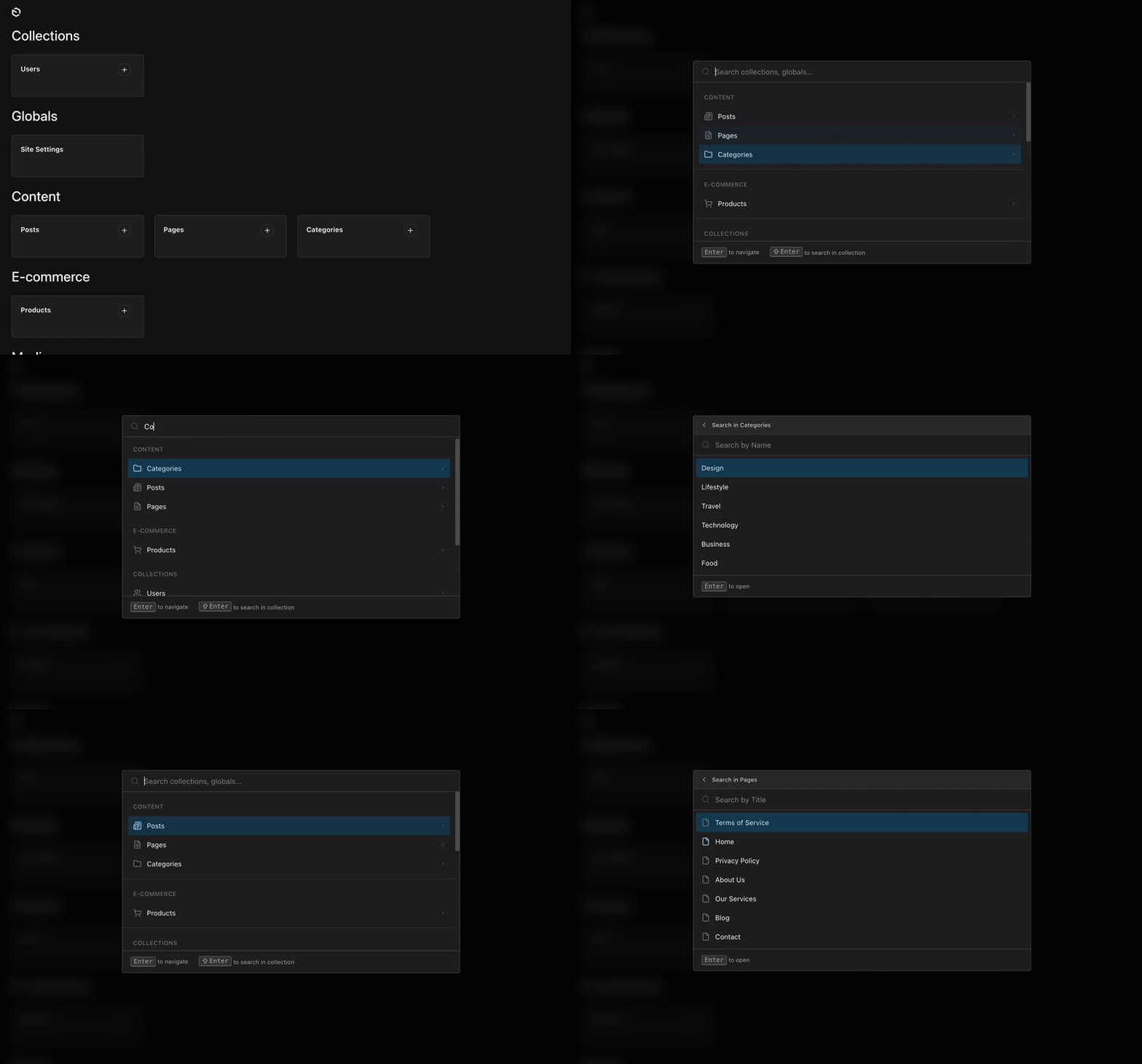
The Payload CMDK Plugin adds a powerful command menu to your Payload CMS admin panel, enabling quick search and navigation through collections, globals, and custom actions using keyboard shortcuts.
Features
- Quick Search: Instantly search across all collections and globals
- Keyboard Shortcuts: Fully customizable keyboard shortcuts powered by react-hotkeys-hook
- Collection Submenu: Search within collection documents by their title field
- Custom Icons: Use any Lucide icon for collections and globals
- Custom Items: Add custom actions and menu groups
- i18n Support: Built-in English and Ukrainian translations, easily add your own
- Cross-platform: Optimized shortcuts for both macOS and Windows/Linux
Installation
npm install @veiag/payload-cmdkQuick Start
1. Add Plugin to Config
The plugin works out of the box with minimal configuration:
import { payloadCmdk } from '@veiag/payload-cmdk'
import { buildConfig } from 'payload'

export default buildConfig({
  // ... your existing config
  plugins: [
    payloadCmdk({
      // Plugin works without any options!
    }),
  ],
})
2. Start Your Server
The plugin will automatically:
- Add a search button to the admin panel
- Enable
⌘K(Mac) /Ctrl+K(Windows/Linux) keyboard shortcut - List all collections and globals in the command menu
- Enable collection submenu search
Default Behavior
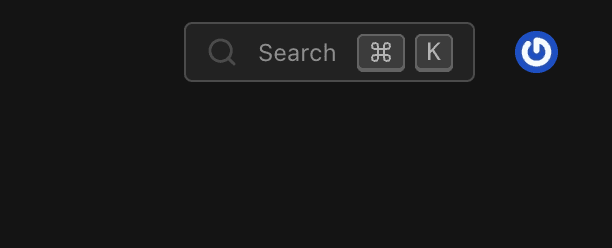
By default, the command menu can be opened with ⌘K on macOS or Ctrl+K on Windows/Linux. A search button will appear in the actions area of your admin panel.
Configuration
Plugin Options
Prop
Type
Full Configuration Example
import { payloadCmdk } from '@veiag/payload-cmdk'
import { buildConfig } from 'payload'

export default buildConfig({
  plugins: [
    payloadCmdk({
      // Keyboard shortcut to open the menu
      shortcut: ['meta+k', 'ctrl+k'],

      // Search button configuration
      searchButton: {
        position: 'actions', // 'actions' | 'nav'
      },

      // Backdrop blur effect
      blurBg: true,

      // Collection submenu configuration
      submenu: {
        enabled: true,
        shortcut: 'shift+enter',
        icons: {
          posts: 'FileText',
          users: 'User',
        },
      },

      // Custom icons for collections and globals
      icons: {
        collections: {
          posts: 'FileText',
          pages: 'File',
          media: 'Image',
          users: 'Users',
        },
        globals: {
          settings: 'Settings',
          navigation: 'Menu',
        },
      },

      // Collections/globals to ignore
      slugsToIgnore: ['payload-migrations', 'payload-preferences'],

      // Custom menu items
      customItems: [
        {
          type: 'group',
          title: 'Quick Actions',
          items: [
            {
              type: 'item',
              slug: 'view-site',
              label: 'View Site',
              icon: 'ExternalLink',
              action: {
                type: 'link',
                href: 'https://your-site.com',
              },
            },
          ],
        },
      ],
    }),
  ],
})
Keyboard Shortcuts
Global Shortcuts
| Shortcut | Action |
|---|---|
⌘K / Ctrl+K | Open/close command menu |
Esc | Close menu or go back in submenu |
↑ ↓ | Navigate items |
Enter | Select item or navigate to collection |
Shift+Enter | Search within collection (default) |
In Submenu
| Shortcut | Action |
|---|---|
Esc | Go back to main menu |
Enter | Open selected document |
Custom Shortcuts
Customize the keyboard shortcut using react-hotkeys-hook syntax:
// Single shortcut
payloadCmdk({
  shortcut: 'ctrl+shift+k',
})

// Multiple shortcuts for cross-platform support
payloadCmdk({
  shortcut: ['meta+k', 'ctrl+k'],
})

// Alternative shortcuts
payloadCmdk({
  shortcut: ['meta+/', 'ctrl+/'],
})
Cross-platform Support
Use meta for macOS Command key and ctrl for Windows/Linux Control key. Provide both for optimal cross-platform experience.
Search Button
Position Options
The search button can be displayed in two locations:
Actions Position (Default)
payloadCmdk({
  searchButton: {
    position: 'actions',
  },
})
Navigation Position
payloadCmdk({
  searchButton: {
    position: 'nav',
  },
})
Hide Search Button
payloadCmdk({
  searchButton: false, // Keyboard shortcut still works
})
Actions button position:
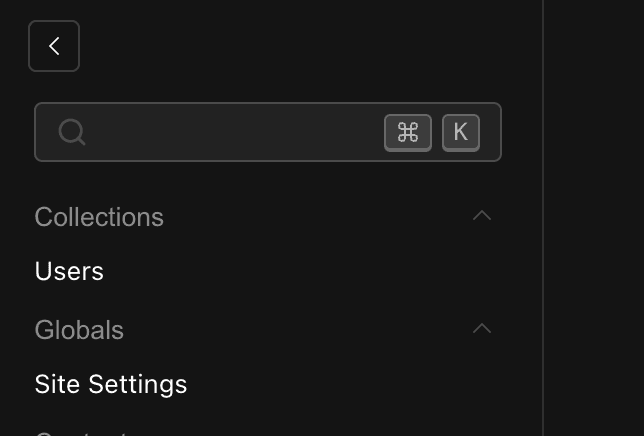
Navigation button position:
Collection Submenu
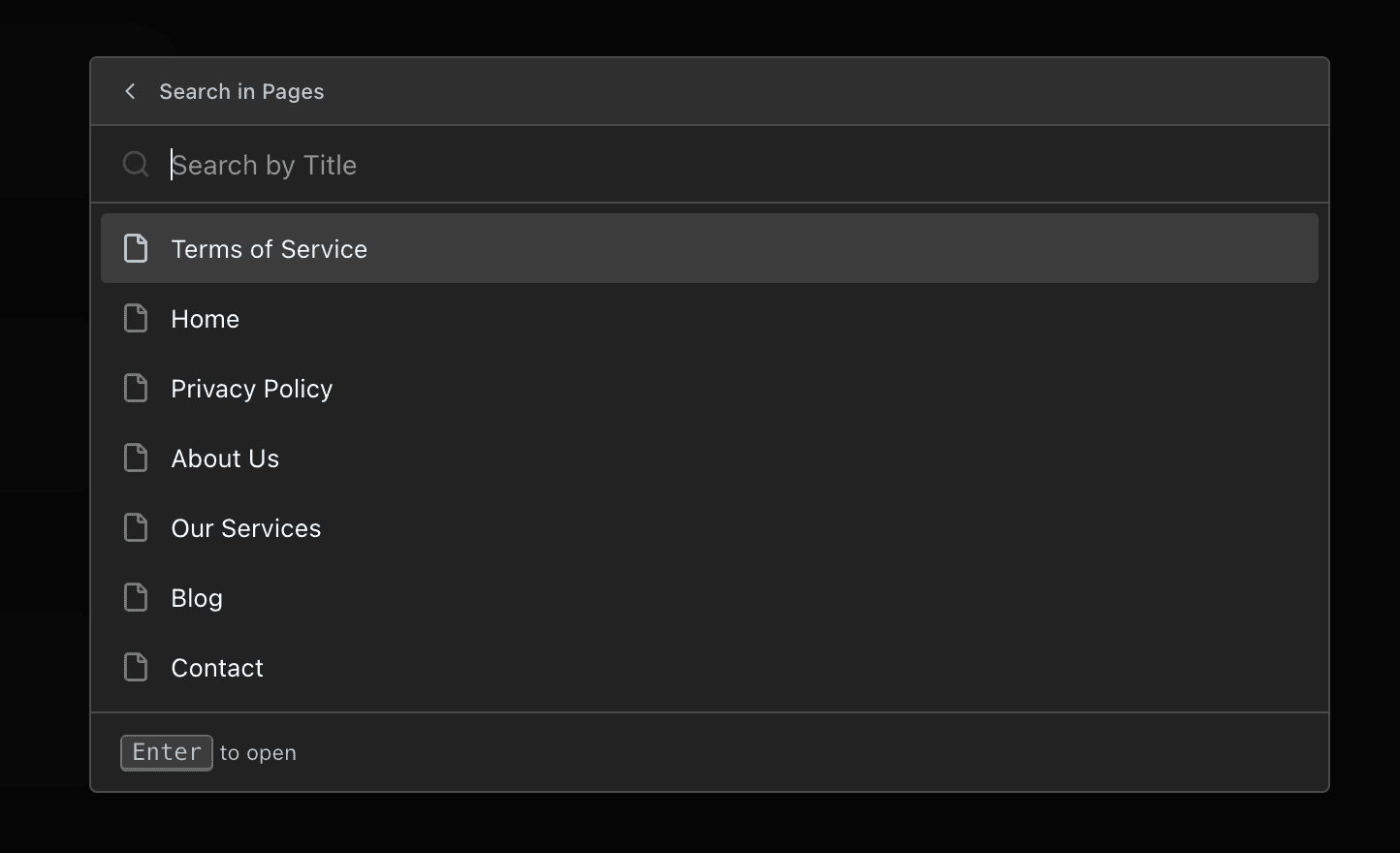
The submenu feature allows searching within collection documents directly from the command menu.
Submenu Configuration
Prop
Type
Shortcut Behavior
Default (shift+enter):
Enter: Navigate to collection listShift+Enter: Open submenu to search within collection
Alternative (enter):
Enter: Open submenu to search within collectionShift+Enter: Navigate to collection list
Example
payloadCmdk({
  submenu: {
    enabled: true,
    shortcut: 'enter',
    icons: {
      posts: 'FileText',
      products: 'ShoppingCart',
    },
  },
})
Title Field Configuration
The submenu searches documents by their useAsTitle field. Configure this in your collection:
{
  slug: 'posts',
  admin: {
    useAsTitle: 'title', // Submenu will search by this field
  },
  fields: [
    {
      name: 'title',
      type: 'text',
      required: true,
    },
    // ... other fields
  ],
}
Important
Ensure your useAsTitle field returns a string value. The plugin currently doesn't support non-string title fields, which may cause rendering errors.
Custom Icons
Customize icons using Lucide icon names.
Default Icons
- Collections:
Filesicon - Globals:
Globeicon
Icon Configuration
payloadCmdk({
  icons: {
    collections: {
      posts: 'FileText',
      pages: 'File',
      media: 'Image',
      users: 'Users',
      categories: 'Folder',
      products: 'ShoppingCart',
      orders: 'Receipt',
    },
    globals: {
      settings: 'Settings',
      navigation: 'Menu',
      footer: 'Layout',
      seo: 'Search',
    },
  },
})
Browse all available icons at lucide.dev/icons.
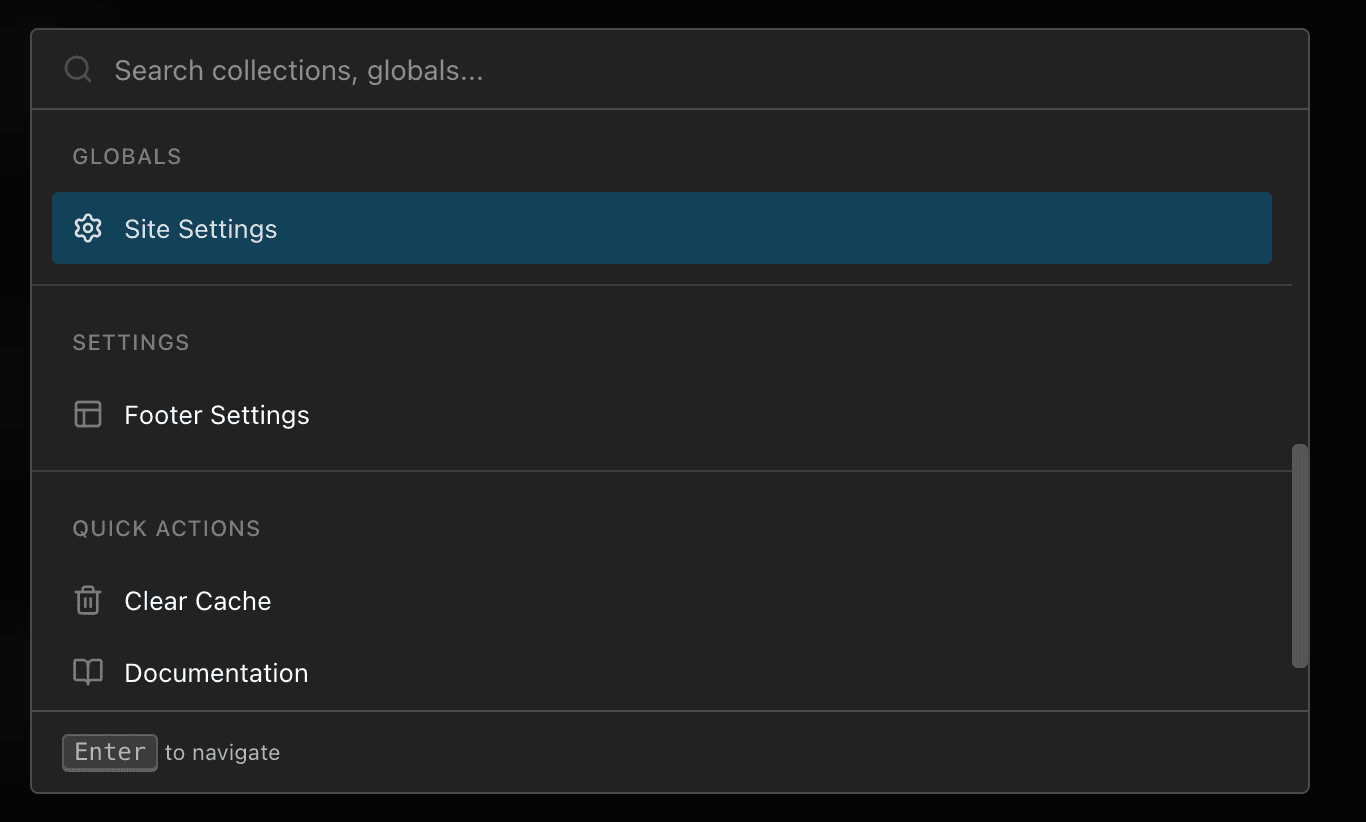
Custom Menu Items
Add custom actions and external links to the command menu.
Custom Item Structure
interface CustomMenuItem {
  type: 'item'
  slug: string
  label: string | LocalizedString
  icon?: LucideIconName
  action: {
    type: 'link' | 'api'
    href: string
    method?: 'GET' | 'POST' | 'PUT' | 'DELETE' // For API actions
    body?: Record<string, any> // For API actions
  }
}

interface CustomMenuGroup {
  type: 'group'
  title: string | LocalizedString
  items: CustomMenuItem[]
}
Examples
Link Action
payloadCmdk({
  customItems: [
    {
      type: 'item',
      slug: 'view-site',
      label: 'View Site',
      icon: 'ExternalLink',
      action: {
        type: 'link',
        href: 'https://your-site.com',
      },
    },
    {
      type: 'item',
      slug: 'documentation',
      label: 'View Documentation',
      icon: 'BookOpen',
      action: {
        type: 'link',
        href: 'https://docs.your-site.com',
      },
    },
  ],
})
API Action
payloadCmdk({
  customItems: [
    {
      type: 'item',
      slug: 'clear-cache',
      label: 'Clear Cache',
      icon: 'Trash2',
      action: {
        type: 'api',
        method: 'POST',
        href: '/api/cache/clear',
      },
    },
    {
      type: 'item',
      slug: 'regenerate',
      label: 'Regenerate Cache',
      icon: 'RefreshCw',
      action: {
        type: 'api',
        method: 'POST',
        href: '/api/cache/regenerate',
        body: { force: true },
      },
    },
  ],
})
Grouped Items
payloadCmdk({
  customItems: [
    {
      type: 'group',
      title: 'Quick Actions',
      items: [
        {
          type: 'item',
          slug: 'view-site',
          label: 'View Site',
          icon: 'ExternalLink',
          action: {
            type: 'link',
            href: 'https://your-site.com',
          },
        },
        {
          type: 'item',
          slug: 'clear-cache',
          label: 'Clear Cache',
          icon: 'Trash2',
          action: {
            type: 'api',
            method: 'POST',
            href: '/api/cache/clear',
          },
        },
      ],
    },
  ],
})
With Localization
payloadCmdk({
  customItems: [
    {
      type: 'group',
      title: {
        en: 'Quick Actions',
        uk: 'Швидкі дії',
      },
      items: [
        {
          type: 'item',
          slug: 'view-site',
          label: {
            en: 'View Site',
            uk: 'Переглянути сайт',
          },
          icon: 'ExternalLink',
          action: {
            type: 'link',
            href: 'https://your-site.com',
          },
        },
      ],
    },
  ],
})
Ignoring Collections
Exclude specific collections or globals from the command menu.
Default Ignored Slugs
['payload-migrations', 'payload-preferences', 'payload-locked-documents']Add to Ignore List
payloadCmdk({
  slugsToIgnore: ['internal-collection', 'test-data', 'drafts'],
})
Replace Default Ignore List
payloadCmdk({
  slugsToIgnore: {
    ignoreList: ['my-hidden-collection'],
    replaceDefaults: true, // Only ignore specified collections
  },
})
Internationalization
The plugin includes built-in translations for English and Ukrainian. Add support for additional languages using Payload's i18n configuration.
Available Translation Keys
All translation keys are under the cmdkPlugin namespace:
| Key | Description | Example (EN) |
|---|---|---|
search | Main search placeholder | "Search collections, globals..." |
searchShort | Short search label | "Search" |
searchIn | Submenu search placeholder | "Search in {{label}}" |
loading | Loading state | "Loading..." |
noResults | No results state | "No results found" |
navigate | Footer hint for navigation | "to navigate" |
searchInCollection | Footer hint for collection search | "to search in collection" |
open | Footer hint for opening documents | "to open" |
Adding Custom Translations
import { buildConfig } from 'payload'

export default buildConfig({
  i18n: {
    supportedLanguages: {
      en,
      uk,
      de,
      fr,
    },
    translations: {
      de: {
        cmdkPlugin: {
          loading: 'Lädt...',
          navigate: 'zum Navigieren',
          noResults: 'Keine Ergebnisse gefunden',
          open: 'zum Öffnen',
          search: 'Sammlungen, Globals durchsuchen...',
          searchIn: 'Suchen in {{label}}',
          searchInCollection: 'in Sammlung suchen',
          searchShort: 'Suchen',
        },
      },
      fr: {
        cmdkPlugin: {
          loading: 'Chargement...',
          navigate: 'pour naviguer',
          noResults: 'Aucun résultat trouvé',
          open: 'pour ouvrir',
          search: 'Rechercher collections, globals...',
          searchIn: 'Rechercher dans {{label}}',
          searchInCollection: 'pour rechercher dans la collection',
          searchShort: 'Rechercher',
        },
      },
    },
  },
  plugins: [
    payloadCmdk({
      // Your config
    }),
  ],
})
Examples
Minimal Setup
export default buildConfig({
  plugins: [payloadCmdk()],
})
Keyboard Shortcuts Only
export default buildConfig({
  plugins: [
    payloadCmdk({
      shortcut: ['meta+/', 'ctrl+/'],
      searchButton: false, // Hide button, only use keyboard
    }),
  ],
})
Blog Setup
export default buildConfig({
  plugins: [
    payloadCmdk({
      icons: {
        collections: {
          posts: 'Newspaper',
          authors: 'UserCircle',
          categories: 'FolderTree',
          tags: 'Tag',
          comments: 'MessageCircle',
        },
        globals: {
          settings: 'Settings',
          navigation: 'Menu',
        },
      },
      submenu: {
        enabled: true,
        icons: {
          posts: 'FileText',
          authors: 'User',
        },
      },
    }),
  ],
})
E-commerce Setup
export default buildConfig({
  plugins: [
    payloadCmdk({
      icons: {
        collections: {
          products: 'ShoppingCart',
          orders: 'Receipt',
          customers: 'Users',
          categories: 'Folder',
          reviews: 'Star',
        },
        globals: {
          settings: 'Settings',
          shipping: 'Truck',
        },
      },
      customItems: [
        {
          type: 'group',
          title: 'Store Actions',
          items: [
            {
              type: 'item',
              slug: 'view-store',
              label: 'View Storefront',
              icon: 'Store',
              action: {
                type: 'link',
                href: 'https://your-store.com',
              },
            },
            {
              type: 'item',
              slug: 'sync-inventory',
              label: 'Sync Inventory',
              icon: 'RefreshCw',
              action: {
                type: 'api',
                method: 'POST',
                href: '/api/inventory/sync',
              },
            },
          ],
        },
      ],
    }),
  ],
})
Full Custom Theme
export default buildConfig({
  plugins: [
    payloadCmdk({
      shortcut: ['meta+k', 'ctrl+k'],
      searchButton: {
        position: 'nav',
      },
      blurBg: true,
      icons: {
        collections: {
          posts: 'Newspaper',
          pages: 'FileText',
          media: 'Image',
          categories: 'FolderTree',
          tags: 'Tag',
          users: 'UserCircle',
          comments: 'MessageCircle',
        },
        globals: {
          header: 'LayoutTemplate',
          footer: 'Layout',
          settings: 'Settings',
          navigation: 'Menu',
          seo: 'Search',
        },
      },
      submenu: {
        enabled: true,
        shortcut: 'shift+enter',
        icons: {
          posts: 'FileText',
          pages: 'File',
          media: 'Image',
        },
      },
      customItems: [
        {
          type: 'group',
          title: 'Quick Links',
          items: [
            {
              type: 'item',
              slug: 'view-site',
              label: 'View Live Site',
              icon: 'ExternalLink',
              action: {
                type: 'link',
                href: 'https://your-site.com',
              },
            },
            {
              type: 'item',
              slug: 'documentation',
              label: 'Documentation',
              icon: 'BookOpen',
              action: {
                type: 'link',
                href: 'https://docs.your-site.com',
              },
            },
          ],
        },
      ],
      slugsToIgnore: ['payload-migrations', 'test-data'],
    }),
  ],
})
Troubleshooting
Objects are not valid as a React child
Cause: Your admin.useAsTitle field is returning an object instead of a string.
Solution: Ensure the field specified in useAsTitle returns a string value:
{
  slug: 'posts',
  admin: {
    useAsTitle: 'title', // Must be a simple text field
  },
  fields: [
    {
      name: 'title',
      type: 'text', // Not an object or complex field
      required: true,
    },
  ],
}
Command menu not opening
Solutions:
- Verify keyboard shortcut isn't conflicting with browser/OS shortcuts
- Check browser console for JavaScript errors
- Ensure the plugin is properly loaded in your config
Icons not displaying
Solutions:
- Verify icon names match exactly with Lucide icons
- Icon names are case-sensitive: use
FileText, notfiletext - Check browser console for errors
Search button not visible
Solutions:
- Check
searchButtonconfiguration isn't set tofalse - Verify
positionvalue is either'actions'or'nav' - Clear browser cache and reload